
MEDIA WALL / COMPARE
MEDIA WALL vs QLab, Mitti and PlaybackPro Plus
Four Mac apps that play media for live events. They are built for different jobs. This page puts prices and features side by side, using each maker’s official pages, so you can pick the one that fits your show.
MEDIA WALL for Mac is the simple one: a grid of video, audio, stills and PDF pages on one Apple Silicon Mac, for a one-time $49. It does not replace a full show-control system.
Prices and features checked on official pages on 13 November 2026. See sources.
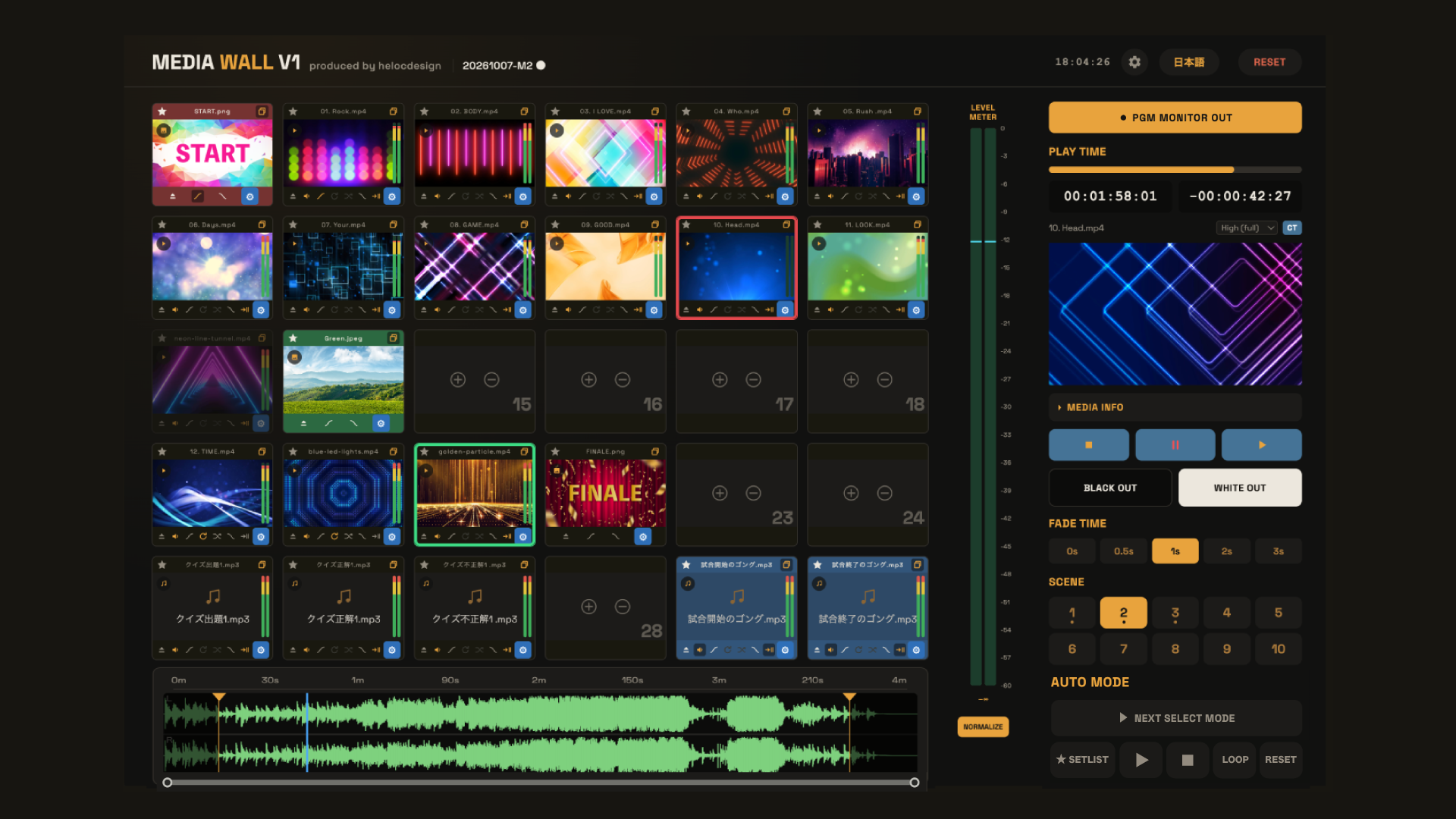
MEDIA WALL for Mac: every cue is a tile. Click to select, then play when the show is ready.
PRICE
What MEDIA WALL, QLab, Mitti and PlaybackPro Plus cost
List prices in US dollars, before tax. Each maker sells more than one option, so the cheapest way in is shown first.
One-time purchase prices, drawn to scale. QLab also has a free version with fewer outputs, and daily rentals from $8.
MEDIA WALL
$49 one-time
Launch price; regular price $89. One registered Mac. Updates within v1.x are included. The free demo is the Mac app itself: 30 days, up to 30 minutes per launch, with a watermark on the output and saving turned off.
QLab 5
Free, or $599–$1,399
The free version has no time limit and includes one single-output video stage, 2 audio output channels and 16 DMX addresses. Paid licenses: $599 for one of Audio, Video or Lighting, $1,099 for two, $1,399 for all three. Each can also be rented for $8, $12 or $15 per day.
Mitti
From $399 + tax
Perpetual license, activates 2 or more computers. Rental from $79.8 + tax, activates 2 computers. A free demo is available.
PlaybackPro Plus
$699 one-time
Internet Activated license, single seat, can be moved between computers. The demo is fully functional with a watermark on the full-screen output. The same maker sells PlaybackPro for $399.
Prices change. Check each maker’s shop before you buy.
FEATURES
MEDIA WALL vs QLab vs Mitti vs PlaybackPro Plus: features
“Not listed” means we could not find the feature on the maker’s official pages. It does not mean the product lacks it. On a phone, swipe the table sideways.
Feature
MEDIA WALL
QLab 5
Mitti
PlaybackPro Plus
Video playback
Yes
Yes
Yes
Yes
Audio files
Yes
Yes
Yes
Not listed
Still images
Yes
Yes
Yes
Yes
PDF pages as media
Yes
No
Yes
Not listed
In / out points
Yes
Yes
Yes
Yes
Waveform view
Yes
Yes
Yes
Not listed
How cues are laid out
Grid of tiles or a cue list, switchable
Cue lists
Playlist of cues
Playlists
Plays a sequence on its own
Yes (SETLIST)
Cue lists
Yes
Yes
Output to an external display
Yes
Yes
Yes
Yes
Stream Deck
Free plugin
Not listed
Plugin or Companion
Not listed
NDI
No
Video License
Yes
Not listed
Blackmagic output devices
No
Yes
Yes
No
Edge blending / warping
No
Video License
Yes
Not listed
Lighting / DMX
No
Yes
Control input only
Not listed
MIDI / OSC / network control
No
Paid license
Yes
TCP / UDP
Runs on Intel Macs
No
Yes
Yes
Yes
Notes. QLab: PDF files are not supported, per its documentation; NDI, edge blending and warping come with the paid Video License; MIDI and network cues come with any paid license; the free version drives one video output device. Mitti: can be controlled by DMX over Art-Net; it is not a lighting desk. PlaybackPro Plus: its product page lists clip volume controls but not audio-only files, and states that UltraStudio, T-Tap and Kona devices are not compatible. MEDIA WALL: PowerPoint slides need to be exported to PDF first.
HEAD TO HEAD
MEDIA WALL next to each one
MEDIA WALL vs QLab 5
QLab is show control: audio, video and lighting cues in one cue list, with MIDI, OSC and timecode. MEDIA WALL only plays media, from a grid of tiles you can see at a glance. Full MEDIA WALL vs QLab 5 comparison
Choose QLab 5 if
You run theatre-style cue lists, drive lighting or other devices from the same file, or need several screens, NDI or warping. Its free version may already cover a simple show.
Choose MEDIA WALL as a QLab alternative if
You want a simpler QLab alternative for playback only: video, audio, stills and PDF pages on one screen, with no cue programming to learn. QLab does not play PDF files; MEDIA WALL does.
MEDIA WALL vs Mitti
Mitti is a professional video playback tool built around a cue playlist, with broadcast-style outputs. MEDIA WALL covers the basic part of that job at a much lower price.
Choose Mitti if
You need NDI, Blackmagic or Syphon output, multi-screen edge blending, timecode, or an Intel Mac. One license also activates two computers.
Choose MEDIA WALL as a Mitti alternative if
You send one program output to a projector or display and want a lower-cost Mitti alternative: $49 one-time against from $399 + tax.
MEDIA WALL vs PlaybackPro Plus
PlaybackPro Plus is a long-standing playback tool for corporate shows, with playlists, a crossfade mixer and remote control over the network. MEDIA WALL lays the same kind of clips out as a grid.
Choose PlaybackPro Plus if
Your crew already works with its runlists and DT Videolabs controllers, you need TCP or UDP remote control, or you use Intel Macs.
Choose MEDIA WALL as a PlaybackPro alternative if
You also need audio files and PDF pages next to your video clips, a free Stream Deck plugin, and a $49 price instead of $699.
WHICH ONE
Which one fits your show?
MEDIA WALL fits if you…
Run live music, seminars or talk events from one Mac.
Want to see every cue as a tile: up to 300 tiles across 10 scenes, in show order.
Want a click to select and a separate action to play, so nothing starts by accident.
Play video, audio, stills and PDF pages, and send the result to one external display.
Prefer to pay once: $49 now, $89 after the launch offer.
Pick another tool if you…
Need NDI, Blackmagic output, edge blending or warping. Mitti lists all of these; QLab lists them with its Video License.
Need lighting, MIDI, OSC or timecode in the same show file. That is QLab’s job.
Use an Intel Mac. The Mac version requires Apple Silicon and macOS 13 or later. On a PC, the separate Windows version requires Windows 11 x64.
Need a separate preview of the next cue. MEDIA WALL’s preview mirrors the program output.
Play ProRes 4444 or HAP files. MEDIA WALL does not support them.
Need the app on several Macs at once. One MEDIA WALL license covers one registered Mac.
NEARBY TOOLS
Two more names you may run into
These often come up in the same search, but they do a different job.
MEDIA WALL vs Farrago 2
$55 one-time
A soundboard for audio only: tiles in a grid, sets, a list mode, and control from MIDI, OSC or Stream Deck. No video, stills or PDF. One license covers all the Macs you own. For macOS 14 to 27.
MEDIA WALL vs Millumin 5
From US$499
A larger toolkit for video mapping, timelines and interactive shows, with DMX, MIDI, OSC and Stream Deck or Companion plugins. Rental from US$39 for 7 days. The trial has no limits for 30 days, then adds a watermark. Needs macOS 11 or later.
QUESTIONS
Common questions
Is MEDIA WALL a QLab alternative?
For simple playback, yes. It plays video, audio, still images and PDF pages from a grid on one Apple Silicon Mac. It is not a replacement if you need lighting, MIDI, OSC, timecode or multi-screen video.
What is the cheapest way to play video cues on a Mac?
QLab’s free version costs nothing and drives one video output. Among paid apps on this page, MEDIA WALL is the lowest at $49 one-time, followed by Mitti from $399, QLab from $599 and PlaybackPro Plus at $699.
Does MEDIA WALL work with a Stream Deck?
Yes. The free MEDIA WALL V1 Controller plugin on the Elgato Marketplace can play, pause and switch scenes.
Does MEDIA WALL run on Windows or Intel Macs?
The Windows version runs on Windows 11 x64 (Intel or AMD). The Mac version requires Apple Silicon and macOS 13 or later. Each version has its own license.
Can I try the Mac version before I buy?
Yes. The free Mac demo is the full app: 30 days from first use, up to 30 minutes per launch, with a watermark on the output and saving turned off. No account needed. Get the free demo for Mac.
TRY IT
Try MEDIA WALL with your own files
The free demo is the same Mac app you would buy. No account needed. It runs for 30 days from first use, up to 30 minutes per launch, with a watermark on the output and saving turned off. A license key removes those limits on one Apple Silicon Mac.
SOURCES
Where these facts come from
Every price and feature on this page was read from the maker’s own pages on 13 November 2026 (Japan time). If something here is out of date or wrong, tell us at Support and we will correct it.
MEDIA WALL (helocdesign tools): product page, Mac license page, Stream Deck plugin. Version 1.0.82.
QLab 5 (Figure 53): shop, feature list, system recommendations, Video cues, video output, Audio cues.
Mitti (Imimot): product page.
PlaybackPro Plus (DT Videolabs): store, product page.
Farrago 2 (Rogue Amoeba): product page, store.
Millumin 5 (Anomes): product page. Prices are shown in US dollars or euros depending on where you browse from.
helocdesign tools is not affiliated with Figure 53, Imimot, DT Videolabs, Rogue Amoeba or Anomes. Product names are trademarks of their owners.